Getting Started with AI for Your Small Business: A Step-by-Step Guide
Nov 16, 2026 · 6 min read
Last updated: November 2026
The short answer: AI for small business starts with one written page, not a major investment in a new tool. Write down who you are, who you serve, what you sell, how you sound and what's off-limits. Give that page to the AI you already have, hand it one small weekly task, and check its work before anything reaches a customer.
Imagine you own a Finger Lakes winery in the first week of harvest.
You hire the best helper you've ever had. Fast, careful, never complains. You say, "Pick the Riesling," and head inside.
By noon every Riesling row is bare. Unfortunately, that also includes the two rows you had planned to leave on the vine for ice wine, which you knew about and never mentioned.
The helper didn't make a mistake. They did exactly what you said. You just didn't realize how much you knew that you hadn't said out loud.
That's how most small businesses are using AI right now. The tool is fast and capable, and it does exactly what you tell it. The trouble is everything you didn't.
What do we mean by "AI" in this series?
In this series, AI means an AI assistant: a program like ChatGPT, Claude, Gemini or Microsoft Copilot that writes, summarizes and answers questions based on what you type into it. What you type is called a prompt, which just means your request.
Here's what that looks like in practice:
| An AI assistant is good at | An AI assistant is not |
|---|---|
| A brainstorming assistant for first drafts of emails, posts and descriptions | A mind reader. It only knows what you tell it |
| Rewriting something to sound clearer or friendlier. | A fact-checker. It can, and often does, state wrong things confidently |
| Summarizing notes, reviews or long emails | A decision-maker on money, legal or HR questions |
| Answering questions from information you give it | Something that runs your business on its own |
The left column is where it saves you time. The right column is why every step below ends with you.
What are the steps to start using AI in your small business?
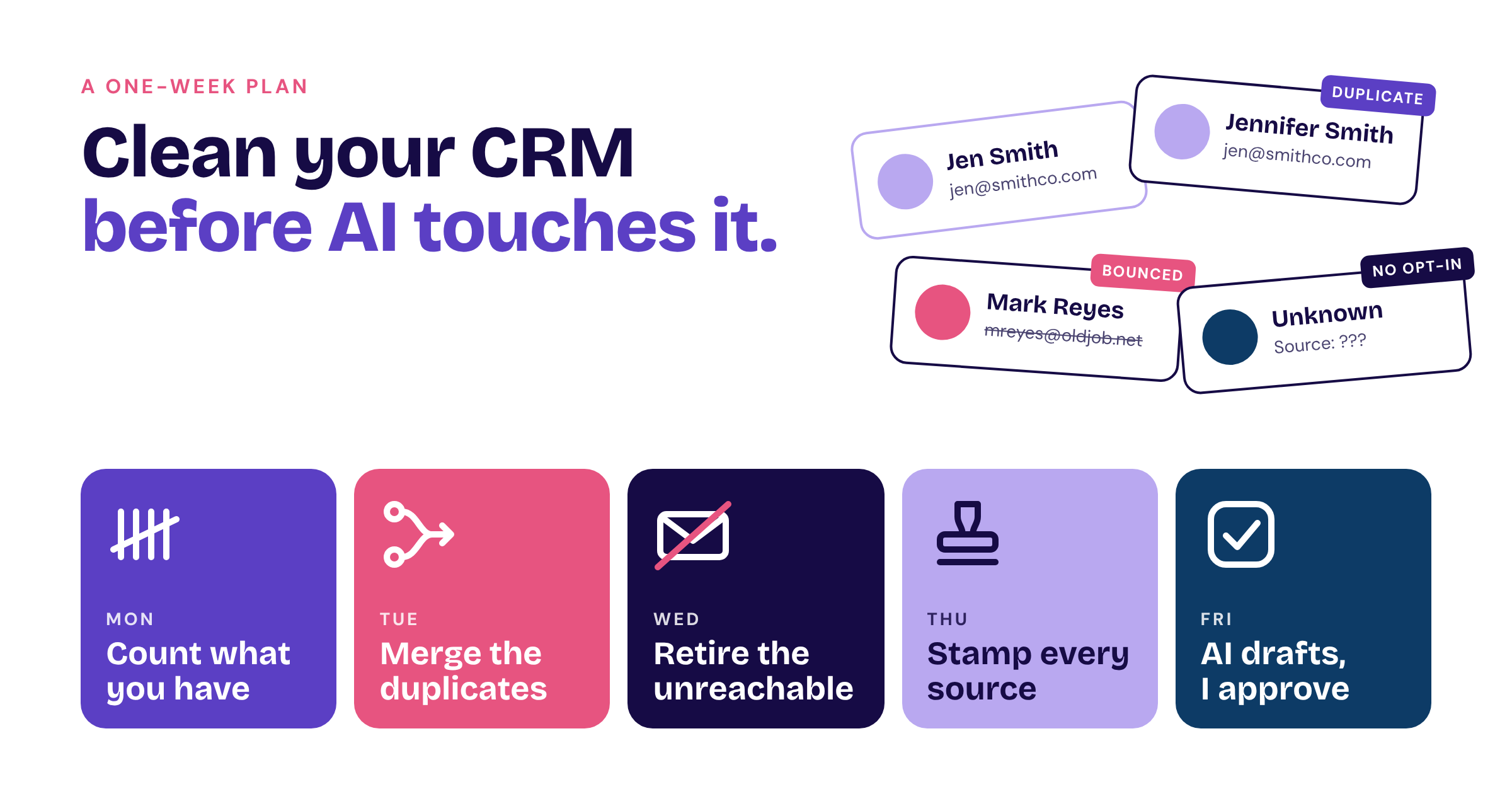
I always recommend my clients follow the five steps below, in order. It's painful at first but, you'll get the time you invest in doing these steps properly back tenfold down the road.
Step 1: Write a one-page business brief
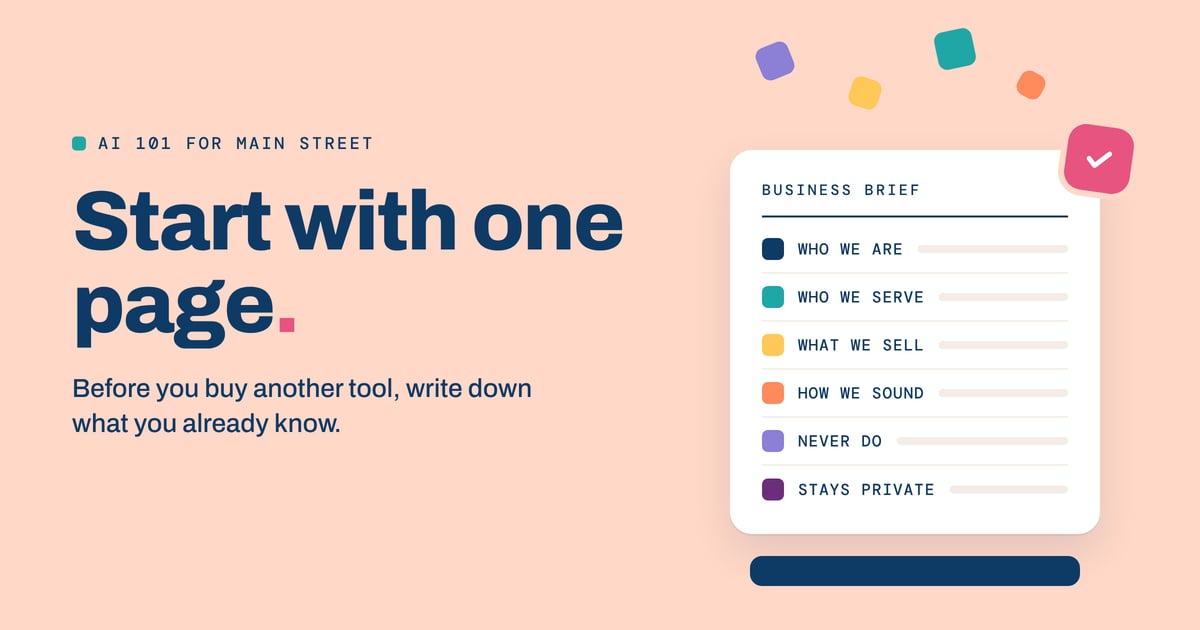
A business brief is one page that tells AI what you'd tell a new hire on day one. Ideally, this brief should cover six things:
- Who you are: "Family-run winery on Seneca Lake. Tasting room open Thursday to Sunday."
- Who you serve: "Weekend visitors from Rochester and Buffalo, plus wine club members."
- What you sell: your top offers, with real prices.
- How you sound: three words, like "warm, plain, a little funny."
- What you never do: "No 'best on the lake.' No discounts on reserve wines."
- What stays private: customer names, emails, card numbers, payroll. These never get pasted in.
Most owners can draft it in an evening. It's the ice wine rows, written down.
Step 2:
Save it where the tool can find it
Most AI assistants have a place for standing instructions, often called "custom instructions" or a "project."
Paste your brief there once so you don't have to repeat it every time.
The AI tools are designed to reference the context each time you begin a new task.
Step 3:
Start with one small job you do every week
Your first AI job should be small, repeated weekly, and harmless if it comes out wrong. Bonus points if it is something that annoys you to have to deal with.
Good first jobs: your tasting room hours post, a wine club newsletter draft, or a reply to the question you get ten times a week.
Not yet: pricing, taxes, HR, anything legal, or your customer list.
Step 4:
Check the draft against your brief
Read what AI wrote the way you’d check a new hire’s work. Wrong hours? Wrong price? Wrong tone? Fix it. But THEN, you must add the context of that fix back into your brief so the problem doesn’t come back.
For example:
- You asked: for a post about this weekend’s tasting room hours.
- AI wrote: “Open Saturday and Sunday, 11 to 5. Bring your friends and stop in anytime.”
- What it missed: during harvest, groups of six or more need a reservation. You know that. Your brief didn’t say it.
- Fix the post: “Groups of six or more, please book ahead.”
- Fix the brief: add one line under “Who we are”: “September and October: groups of six or more require a reservation.”
If you only fix the singular post, you’ll make the same correction next week.
Fix the brief, and you make it once.
Step 5:
It's not done until a human sees it.
A draft isn't done.
A scheduled email isn't done.
It's done when a real customer receives it, interacts with it and/or is able to actually use it.
Setting up my own business's systems this fall, I started designing a thank-you email around September 10. The first real person received one on September 28.
That gap is where good intentions (and profits) go to wait.
Is AI worth it for a business my size?
Yes, AI is an absolute advantage for small businesses but only once you've completed Step 1. Without the brief, your business is going to get generic work and likely decide AI isn't all that helpful.
That pattern shows up in real-life numbers, too. In early 2026, the Goldman Sachs 10,000 Small Businesses Voices survey found that 76% of small businesses use AI, but only 14% have fully built it into their core operations.
I read that as: lots of trying, not much sticking.
I've built AI agents at billion-dollar companies, and the expensive part was never the software or the tool. It was writing down how the business actually works.
The good news is, as a small business, you can do the small version tonight at the kitchen table, for free.
Difficult questions, answered.
Is it safe to put my business information into an AI tool?
Your business basics, like your hours, offers and tone, are fine to share.
Customer names, emails, card numbers and payroll should stay out, especially in free tools and especially if the data is not public information.
Before you start, open the tool's settings and look for its data or privacy controls. Many let you stop your conversations from being used to train the AI.
Which AI tool should a small business use?
Start with the one you already have.
Many owners already have an AI assistant built into their email, phone or office software.
The brand matters far less than the context you give it. A free tool with a clear one-page brief will beat an expensive tool that knows nothing about your business.
Will AI replace my staff?
No, not that I have seen personally. Most owners aren't using it that way.
In the Goldman Sachs 10,000 Small Businesses Voices survey from early 2026, 87% of small businesses using AI said it augments their workforce rather than replacing it.
The best early uses take drafting and repetitive writing off your team's plate so they have more time for customers.
Want a head start?
Take one small-step towards fixing it finally.
A Game Plan is $500, with a written 90-day marketing plan, which makes good context to hand your AI assistant.
No long-term retainer pitch, guaranteed.
Got a difficult question of your own?
Leave a comment. Your email stays private.